Learning preferences
Level, difficulty, goal, and display aids.
1 min read
All of these live in Settings, under Learning.
- Set your level so content matches where you are.
- Choose a difficulty that stretches you without swamping you.
- Pick a daily goal you can still reach on a busy day.
- Turn kana or romaji aids on or off as you grow.
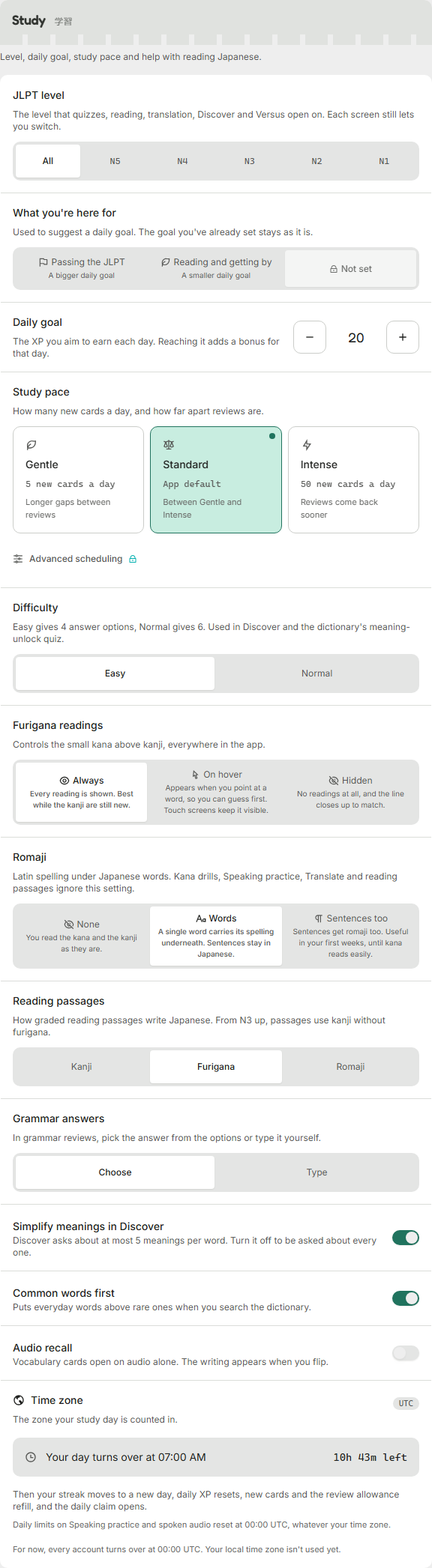
- Level starts unset, which means content from every level you can reach.
- Difficulty starts on Easy, with 4 answer options in Discover and the meaning-unlock quiz. Normal gives 6.
- Daily goal starts at 20 XP.
- Show kana starts on, and Romaji starts at Words.
Changing your level is not destructive
Your level only filters which new content is offered. Your cards, review schedule and progress at other levels stay as they are.
You can also add a reverse deck (meaning to Japanese) and limit how many meanings a card teaches at once.
Was this helpful?